
Microsoft 365 Copilot got an agentic upgrade this summer. Copilot Cowork went from a Frontier preview feature to worldwide general availability on June 16, 2026, and with that came something IT and finance teams can't ignore: a metered, usage-based billing model sitting on top of your existing Copilot license.
I've spent the last few weeks getting Cowork configured properly for a pilot group — scoped access, spending policies, the works. Here's what it is, how to set it up without accidentally opening it to your whole tenant, how to actually govern the costs, and where the tooling still isn't where it needs to be.
1. What is Copilot Cowork?
Regular Copilot Chat helps you think — it drafts a sentence, answers a question, suggests something you then go act on. Cowork is different: you describe an outcome, and it goes and does the work. Plan a meeting, organize an inbox, research a company — Cowork breaks that into subtasks, pulls context from across your Microsoft 365 environment through Work IQ, calls whatever tools it needs, and comes back with a finished result.
A few things worth knowing about it:
- It ships with real skills. Word, Excel, PowerPoint, PDF, Email, Scheduling, Calendar Management, Meetings, Daily Briefing, Enterprise Search, Communications, Deep Research, and Adaptive Cards are all native. You can also drop a custom
SKILL.mdfile into a OneDrive folder to extend it. - It always checks in before it acts. Sending an email, posting to Teams, scheduling a meeting — Cowork asks first, every time. You watch it work in real time and approve or deny each consequential step.
- It runs everywhere you already work. Browser (m365.cloud.microsoft), Outlook, Teams, the desktop app on Windows and Mac, and mobile.
- It's genuinely multi-model. Under the hood, Cowork routes between Claude Opus and Sonnet (Anthropic), a Sonnet+Opus advisor pairing, GPT 5.5, and Imagen 2 for images. Claude Fable 5 is available as a preview model but off by default — it requires data retention, which is worth knowing if that matters for your governance posture. You can turn the entire Anthropic model family off in Copilot settings if you need to.
Microsoft reports more than half of the Fortune 500 used Cowork during its three months in Frontier preview, alongside names like Accenture, Avanade, Capital Group, and Zurich Insurance. Some independent coverage of the launch has called it one of the fastest-adopted features in Frontier's history — that specific claim doesn't show up in Microsoft's own announcement, but the adoption numbers speak for themselves either way.
That popularity is exactly why the billing model changed at GA. Which brings us to the actual setup work.
2. How do you set it up?
If you're rolling this out to more than a handful of trusted people, don't just flip a switch — scope it. Here's the sequence.
Prerequisites
- A Microsoft 365 Copilot license per user, on a qualifying base plan (Business Standard, Business Premium, E3, or E5)
- An Azure subscription for pay-as-you-go, or a prepaid Copilot Credits pack (Microsoft calls the plan "P3" — there's no P1 or P2, that's just the name)
- Global Admin or Billing Admin rights
Watch out for: if your tenant is managed by a CSP (Cloud Solution Provider), you may not be able to set up usage-based billing yourself at all — even with your own Azure subscription sitting right there. The admin center points you back to your provider instead. More on this in the challenges section below.
Step 1 — Turn on usage-based billing
Go to Microsoft 365 admin center → Copilot → Cost Management → Get Started. From there:
- Pick your billing method — an existing Azure subscription, a new one, or your prepaid Copilot Credits plan
- Set a monthly spending limit for the org
- Optionally set per-user or per-group limits
- Configure alerts
- Activate
Nothing works until this is done. Cowork ships off by default in every tenant, and a Copilot license alone doesn't unlock it.
Step 2 — Scope it to a pilot group, not the whole tenant
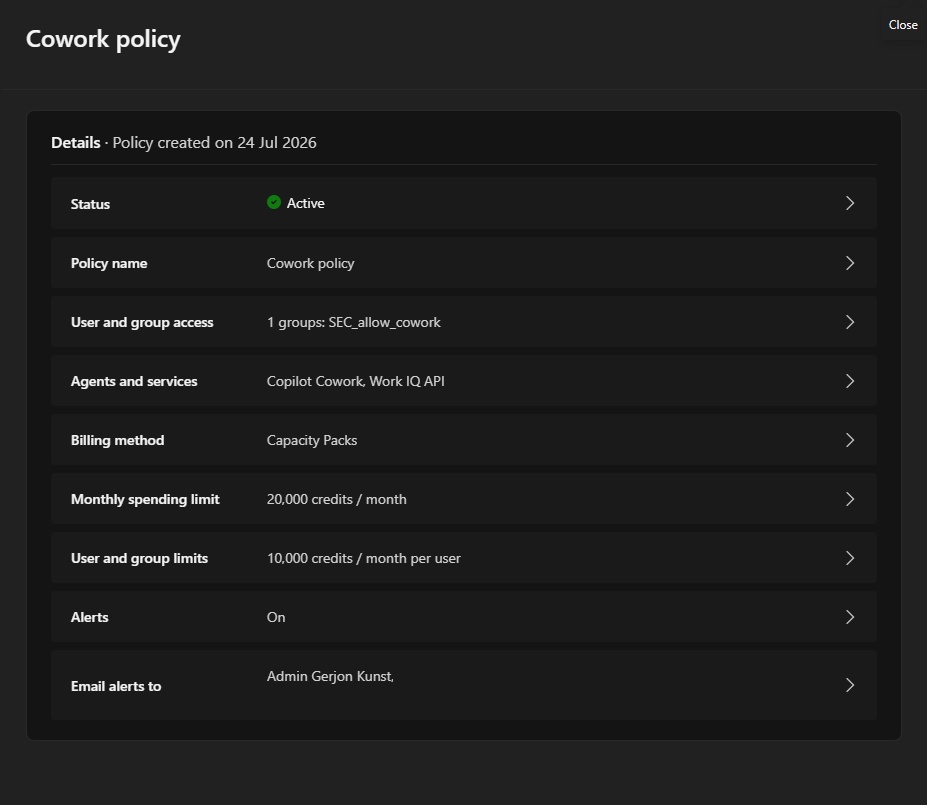
This is the part people skip, and it's the one that actually matters. The User and group access field in your spending policy determines who can use Cowork — it's not just a billing setting, it's the access gate.
- Create a dedicated security group in Entra ID — I used
SEC_allow_cowork - Add your pilot users
- In the policy, switch User and group access from "All users" to your specific group
Step 3 — Don't get tripped up by the discoverability toggle
There's a second, separate setting: Copilot → Settings → AI experiences enabled by usage-based billing, off by default. It's tempting to assume you need this too — you mostly don't. Setting up a spending policy for a user overrides this toggle entirely: anyone already in a policy sees Cowork regardless of what this switch says. It only affects users who aren't in any policy yet — whether they see Cowork exists and can request access (which you'd still have to approve). If you've already scoped access via your security group, this one's mostly noise.
Here's what a correctly scoped policy looks like once it's active — a tenant cap, a per-user cap, alerts on, and access locked to a single security group:
Step 4 — Test it
Open Microsoft 365 Copilot, switch to Cowork next to Chat, and try one of the suggested prompts — Organize my inbox, Prep for a meeting, Research a company — or type your own. Watch it work through the steps live. After a task finishes, type /cost in the task window to see exactly what it consumed.
3. How do you govern the costs?
Cowork bills separately from your Copilot license, metered in Copilot Credits at roughly $0.01 each on pay-as-you-go. What actually drives the cost of a task comes down to four inputs: which model runs, how much organizational context gets pulled in, how many tools get called, and how long it runs.
Published estimates consistently land on three bands:
- Light (a simple, single-source ask — draft a status update): ~100–300 credits, $1–$3
- Medium (multiple sources, structured reasoning, several outputs): ~300–700 credits, $3–$7
- Heavy (broad aggregation, deep reasoning, many outputs — think comparing thousands of files): 700+ credits, $7 and up, no fixed ceiling
At least one report has cited an outlier scenario — a task chaining multiple models and pulling context across an entire organization — running as high as $230. That's not a typical heavy task, but it shows how uncapped, context-heavy multi-model workflows can compound fast.
The governance toolkit Microsoft ships with this has three layers:
- Spending policies with limits — tenant-wide, per-group, and per-user caps. Worth knowing: Microsoft's own default policy caps every Copilot-licensed user at 200 credits/month (~$2) until you change it. Treat that as a placeholder to revisit deliberately, not a number to leave alone.
- Alerts — configurable thresholds that notify IT or finance before a cap actually gets hit.
- The Cost Management dashboard — under Copilot → Cost Management, where you can break down consumption by user, group, service, or agent, and spot your heaviest users before they blow the budget.
A few habits I'd build in from day one:
- Run the Cowork Cost Estimator before rollout — model your expected usage against real personas instead of guessing
- Set group budgets that reflect actual task mix — a research-heavy team burns credits faster than a team doing light inbox triage
- Remember Copilot Credits are a shared currency — the same pool feeds Copilot Studio, Dynamics 365, and Power Platform usage-based billing, so factor in what you're already spending there
- Know the credit-request flow — when a user runs out mid-task, they can request more from inside Cowork, and someone needs to own approving those
4. What are the current challenges with cost governance?
Being upfront about sourcing here: Microsoft's own docs explain how the governance tools work, not their limitations. Everything below comes from independent analysts, consultancies, and admins who've actually run Cowork since GA — not from Microsoft's own materials. The patterns are consistent across multiple independent sources, so I'd treat them as credible, but they're outside perspectives on a one-month-old billing model, not shortcomings Microsoft has acknowledged itself.
Cost per task is inherently unpredictable. (independent analysts) Because the four billing inputs vary per task, two similar-looking prompts can land in completely different cost bands. IT and finance are used to flat, predictable per-seat software costs — a range from $1 to $7-and-up per task, with reported outliers well beyond that, doesn't fit cleanly into a quarterly budget.
A small number of power users drive most of the spend. (independent analysts) Without limits and alerts set from day one, a handful of heavy users can burn through a disproportionate share of the budget — and a tenant-wide average can hide that two or three people are responsible for most of it.
Visibility has lagged behind the billing itself. (early-adopter feedback, reported by third parties) A recurring complaint: usage limits went live before the reporting tools to see what's actually being consumed — and by whom — were fully mature. The Cost Management dashboard, which is documented by Microsoft, is the direct response to this, but Frontier-preview adopters describe a real gap between "billing is live" and "reporting caught up."
The built-in controls are still fairly blunt. (independent analysts) Spending limits exist, but mapping the four billing inputs to your organization's actual workflows takes real telemetry and ongoing review — this is a discipline, not a one-time setup.
CSP-managed tenants can hit a hard wall. (documented admin experience, not covered in Microsoft's own setup docs) If your tenant is managed by a CSP, you may not be able to configure usage-based billing yourself — full stop — even with your own Azure subscription. This is a structural gap, not a misconfiguration, and it can stall a rollout that's otherwise ready.
The two-gate access model causes confusion. (independent analysts and admin reports) Between the discoverability toggle and spending-policy scoping, admins have reported Cowork appearing to "disappear" for users right after GA — especially people who had it during Frontier preview. Usually not a bug, just the new gating doing what it's designed to do, but it's an extra layer to explain when something looks broken.
You're now paying twice. (confirmed directly by Microsoft's own billing structure) Copilot licensing and Cowork consumption are two separate cost lines. That's a real shift away from the flat per-seat model most IT budgets are built around, and it means Cowork cost governance can't just get bolted onto your existing license-management process — it needs its own owner.
TL;DR
- Cowork is the agentic layer in Microsoft 365 Copilot — it executes multi-step work, not just single answers, and it always asks before it acts.
- It ships off by default. Turning it on means setting up usage-based billing under Copilot → Cost Management, which is the actual access gate — not the discoverability toggle.
- Scope access to a pilot group via a security group in the User and group access field before you activate, or you'll open it tenant-wide by default.
- Costs are metered in Copilot Credits ($0.01 each), driven by model, context, tool calls, and runtime — light tasks run $1–$3, heavy ones $7 and up with no real ceiling.
- Set spending limits, alerts, and check the Cost Management dashboard regularly — the 200-credit default per user is a starting point, not a policy.
- The governance tooling is still catching up to what finance teams actually need — cost unpredictability, thin visibility, and CSP billing walls are real, current pain points, reported consistently by independent admins and analysts, not yet addressed head-on by Microsoft.
Based on Microsoft Learn documentation, the Microsoft 365 Blog GA announcement, and independent analysis from several Copilot Cowork admin write-ups published since launch.